
Cake Mountain Beginner Guide
Complete the first full loop and make a useful first upgrade without guessing.
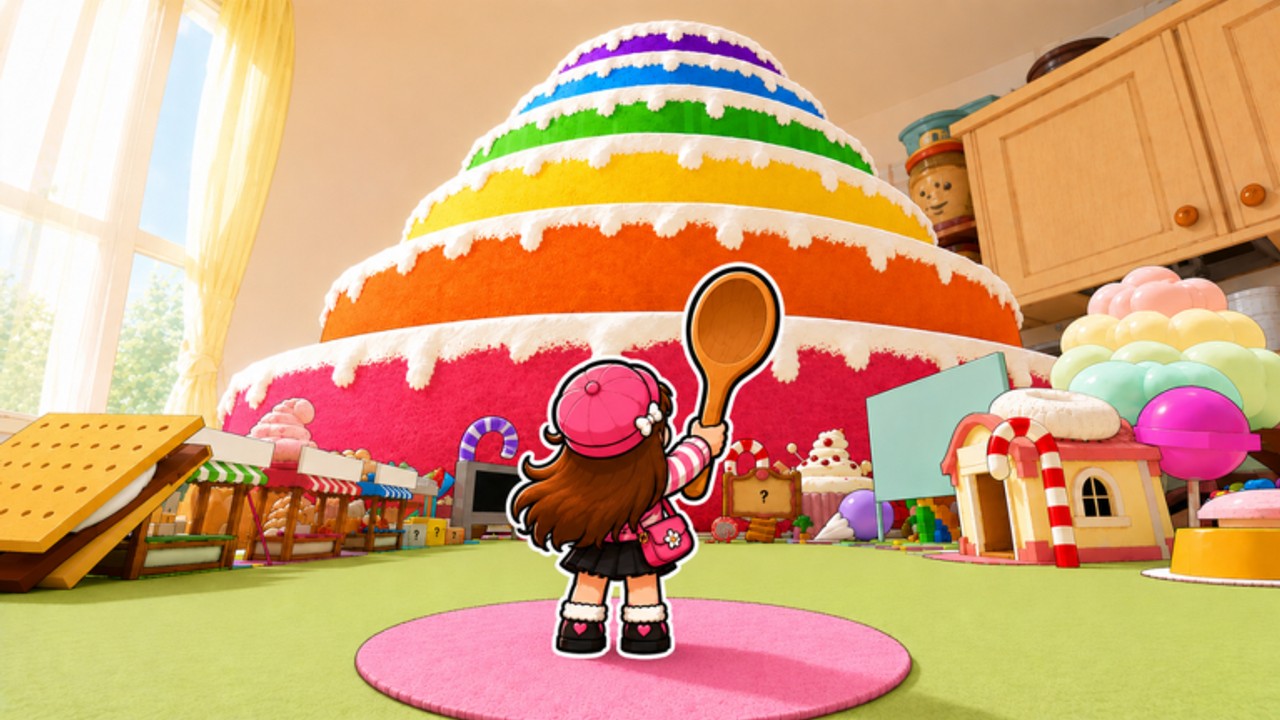
This is the most basic Cake Mountain walkthrough on the wiki. If you have never played before and you want to know exactly what to do in your first five minutes, read this page. It skips explanations and goes straight to steps. For the longer version with reasoning, open getting started after you have finished your first loop.
Before you open the game
Join the FUNgry group on Roblox before you play. The official listing promises a free Special Plate and a luck bonus for members. The luck bonus applies to every session you play as a member. If you have never joined a Roblox group from a game listing, the group bonus walkthrough has screenshots.
Do this now. It takes thirty seconds and the bonus is yours.
Step by step first session
1. Open Cake Mountain on Roblox. You spawn in a pastel kitchen. A giant rainbow layered cake fills the room. You are holding a wooden spoon. This is not a menu. You are already playing.
2. Walk to the cake. Use WASD or the thumbstick to move. Walk up to any cake layer you can reach. You do not need to be on the highest layer yet.
3. Click or tap to swing the spoon. Left click on PC. Tool button on mobile. Slices of cake go into your bag automatically when you swing near them.
4. Watch your bag. Your bag fills up. When it is full, you stop picking up cakes even if you keep swinging. This is normal.
5. Find where to sell. Look for a sell action in the UI or near the kitchen area. Click it. You get coins. This is the entire economy of the game.
6. Return to the cake and repeat. The loop is: swing, fill bag, sell, return, swing.
7. Open the upgrade shop. Look for a shop icon or menu. Buy the next spoon upgrade or bag upgrade with your coins. One of those two is almost always the right first buy.
That is the complete first session. You do not need to understand rarity yet. You do not need to buy Robux. You do not need codes. You just need to know that swing, fill, sell, upgrade exists.
Why this order matters
If you skip joining the group, you lose the luck bonus before you start. If you skip selling and go straight to the shop, you have no coins. If you buy a Robux pass before you know what your bottleneck is, you are guessing. The order above is the order that works.
After the first upgrade
Once you have bought one spoon or bag upgrade, you have completed the tutorial without anyone explaining it. The game just gave you a stronger tool and sent you back to the cake.
Now read how to play for the full controls breakdown. Read upgrades when you have enough coins for your next buy. Read how to get rare cakes when Common layers start feeling thin.
Bookmark codes even though nothing was active in September 2026. Bookmark updates for patch notes when the listing updates.
What you do not need yet
- You do not need to worry about Mythical cakes on day one.
- You do not need to buy Starter Pack or any Robux pass yet.
- You do not need to know every cake name.
- You do not need a private server.
- You do not need a script.
You need the group, the loop, and one coin upgrade. Everything else builds from that.
Frequently Asked Questions
Quick answers to the most common Cake Mountain questions.
What do I do first when I open Cake Mountain?
Join the FUNgry group for the luck bonus before you swing. Then walk to the cake and start swinging.
How do I get coins?
Swing the spoon near cake slices to fill your bag. When the bag is full, find the sell action to cash out.
What should I buy first?
The next spoon upgrade or bag upgrade from the shop. One of those two is almost always the right first buy.
Do I need to spend Robux?
No. Not on day one. Play the free loop first. If you later want to buy a pass, read the game pass tier list and value tool.
Where do I find the group bonus?
Join the FUNgry group from the game listing on Roblox. Steps are on the group bonus walkthrough.
What comes after the first upgrade?
Read how to play for controls and upgrades for the next coin spend.